Blog · AI Agent News · AI video VIEN
NVIDIA driver SSD writes: Check with Resource Monitor
GeForce 621.14/621.24 users report 3–30 GB/hour of idle writes. Check NVDisplay.Container.exe, monitor SSD writes, and consider rolling back to 621.01.
In this article
How much data do GeForce 621.14 and 621.24 reportedly write at idle?
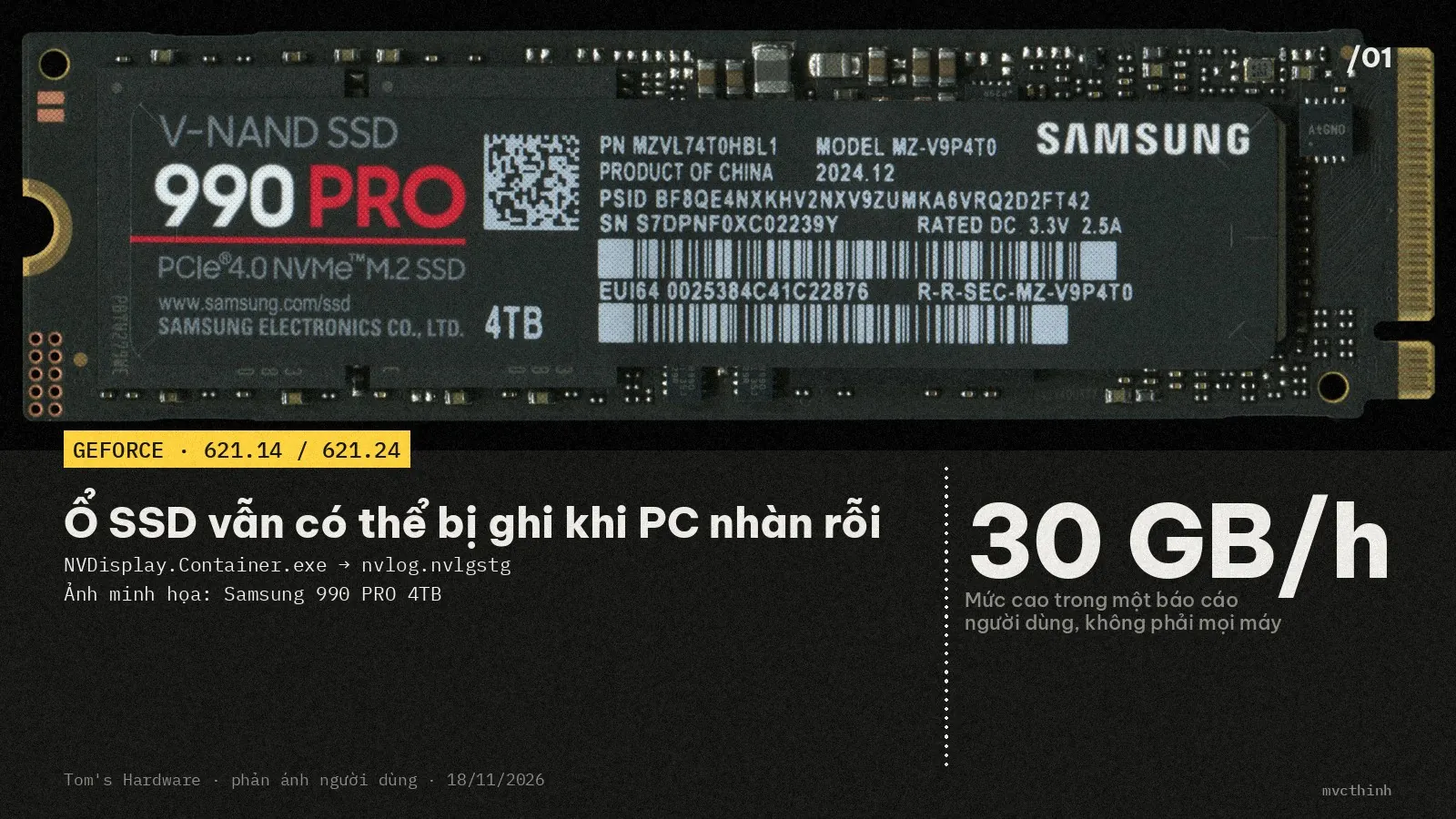
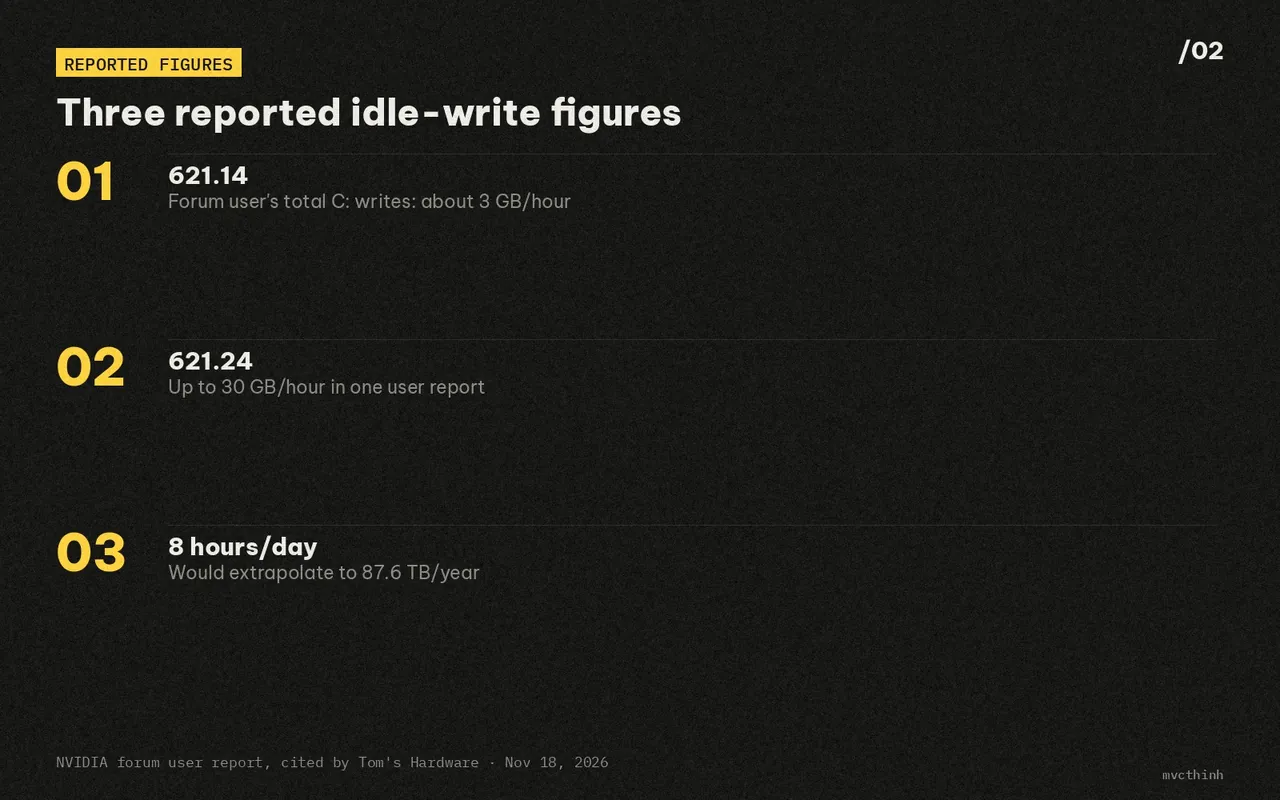
Users have reported background writes on GeForce 621.14 and 621.24 while Windows is idle. Tom’s Hardware cited a measurement posted by Andergraude on the NVIDIA forums: total writes to the C: drive reached about 270 MB over five minutes on 621.14, or roughly 3.2 GB/hour if sustained. One 621.24 user reported a peak near 30 GB/hour.
These are community reports, and not every PC is affected. Tom’s Hardware linked the 621.14 measurement to the NVIDIA GeForce forum thread; the 30 GB/hour figure came from a separate 621.24 forum report.

Why is NVDisplay.Container.exe being investigated?
The reports focus on NVDisplay.Container.exe, part of the NVIDIA Display Container LS service. Users say it repeatedly rewrites a log called nvlog.nvlgstg under C:\ProgramData\NVIDIA Corporation\nvtopps\nct. GeForce 621.14 was released on November 4, 2026, and 621.24 on November 12, according to Tom’s Hardware and GenK’s November 19 report (GenK).
There’s an important measurement distinction: a process’s write counter is not always the same as the amount actually written to the whole drive. In the user measurement cited by Tom’s Hardware, NVDisplay.Container.exe reported about 515 MB of writes over five minutes, while total writes to C: were about 270 MB. The 30 GB/hour figure for 621.24 also comes from one user report, not a multi-system lab test. Disabling telemetry in the NVIDIA App did not help that user; each Alt+Tab was also reported to add another 500 MB to 1 GB of writes.
The annual totals are striking, but they are extrapolations. If 270 MB every five minutes continued around the clock, that would be about 28 TB per year. At 30 GB per hour for eight hours a day, it would be 87.6 TB per year. Against the 600 TBW rating common for a 1 TB SSD, that second estimate is about 14.6% of the rated host-write figure per year. It does not prove that all those reported writes reached NAND flash or that the drive will lose exactly that fraction of its life; the 30 GB/hour figure is a user report, and process I/O and total drive writes can differ.
 Also readApple Releases FastFrames: 35.4 ms AI Video on One GPU
How can you check with Windows Resource Monitor?
Open Windows Resource Monitor, select Disk, and look for NVDisplay.Container.exe and nvlog.nvlgstg to check for write activity. If nothing appears, leave the PC idle for a few more minutes and check again; activity may be intermittent.
- Press Win + R, type resmon, and press Enter.
- Select the Disk tab.
- Under Processes with Disk Activity, find NVDisplay.Container.exe and sort by Write (B/sec) to see which process is writing the most.
- In Disk Activity below, look for a path containing nvlog.nvlgstg and check its Write (B/sec). If no writes appear, leave the PC idle for a few more minutes and check again; activity can come and go.
flowchart TD
  A[Win+R: open resmon] --> B[Select Disk tab]
  B --> C[Sort by Write (B/sec)]
  C --> D{See nvlog.nvlgstg?}
  D -->|Yes| E[Compare writes and SMART]:::key
  D -->|Not yet| F[Leave idle and check again]:::muted
  classDef key fill:#1d1a10,stroke:#ffd23f,color:#ffd23f,stroke-width:1.6px
  classDef human fill:#181817,stroke:#e8e6df,color:#e8e6df,stroke-dasharray:5 3
  classDef data fill:#1c1c1b,stroke:#8d8b85,color:#cfcdc6
classDef muted fill:#181817,stroke:#3d3d3a,color:#8d8b85What should you do if writes look abnormal?
First, open CrystalDiskInfo and note Total Host Writes, or Data Units Written if your drive labels the SMART field differently. Leave the PC idle for a few minutes and compare the counter with the activity in Resource Monitor. The goal is to confirm that total drive writes are rising abnormally, rather than relying only on one process’s I/O counter.
If you are on 621.14 or 621.24 and see repeated writes to nvlog.nvlgstg, some users report that temporarily rolling back to GeForce 621.01 reduces the activity. Tom’s Hardware reported less than 2 MB of writes in five minutes on 621.01 in the same test and cited another user who said the rollback helped. This is a community-reported workaround, not an official NVIDIA fix. When Tom’s Hardware published on November 18, 2026, it said NVIDIA had not acknowledged the issue or announced a hotfix (Tom’s Hardware). Before downgrading, check the driver for your specific GPU and consider which fixes you would lose.
Do not assume that disabling telemetry is enough: the 621.24 user cited in Tom’s Hardware’s report said it did not stop the writes. If your PC shows no abnormal background activity, there is no reason to panic or roll back solely because you have 621.14 or 621.24 installed.
My take on day-one GeForce driver updates
My take is to wait for community feedback before installing a GeForce driver on day one, unless you urgently need a specific fix. The 30 GB/hour figure is one user report, and I have not reproduced it on a Windows PC, so it should not be treated as a result for every system.
After a driver update, local AI users, editors, and gamers can check Resource Monitor while the PC is idle, especially if the system SSD’s host-write counter starts climbing unexpectedly. This article is based on measurements and community reports covered by Tom’s Hardware, the NVIDIA forums, and GenK.
Tom’s Hardware previously covered a separate idle-write report involving AMD Radeon’s External Events Utility. The symptom was similar, but the process and circumstances were different; there is no basis to conclude that both incidents share a cause (Tom’s Hardware on the AMD reports).
If Resource Monitor shows repeated writes to nvlog.nvlgstg, note your driver version and compare the SSD’s total writes before deciding whether to roll back to 621.01.
Sources
- Nvidia GeForce driver bug reportedly hammers SSDs with up to 30GB of writes per hour Tom's Hardware
- GeForce GRD 621.14 Feedback Thread (Released 11/4/26) NVIDIA GeForce Forums
- Continuous writing of gigabytes to SSD to nvtopps file, 621.24 NVIDIA GeForce Forums
- Sau AMD, đến lượt driver NVIDIA “tra tấn” SSD người dùng GenK
- AMD admits GPU driver bug is writing data continuously, wearing out SSDs Tom's Hardware
 Safety & policy · Nov 21, 2026Nvidia Without Jensen Huang: Where Do CUDA and GPUs Go?
Analyzing Nvidia after Jensen Huang: the 60-report leadership gap, Claude Mythos and AMD pressure on CUDA, and what GPU buyers face next.
 MCP & tools · Nov 19, 2026Search Browser vs Chrome: Is a 10.8 MB Mac Browser Worth It?
A practical comparison of Search Browser v1.0.14 (WebKit) vs Chrome on macOS: real benchmarks, Arc-style features, extension limits, and who should switch.
▶AI video · Nov 18, 2026Turning a 2D Painting Into a 3D Scene With Opus 5.5 in toEditInstead of spending 2–3 days modeling and aligning cameras in Blender, I fed a 2D reference image into toEdit for Opus 5.5…